

A “data annotator” title can cover anything from tagging text to reviewing model responses, so the label alone won’t tell you whether a role is a good fit. Data annotation jobs vary by task, experience level, location eligibility and how work is assigned. Compare the actual duties and terms, not just the title.
Remote roles can offer clear requirements, but comparing listings takes care. Some focus on image, audio or video labelling; others call for language skills, subject expertise or quality review. Pay may be hourly, salaried or task-based, and a stated rate alone doesn’t tell you how much work is available or whether a project will continue.
This guide explains common annotation tasks and role categories, what employers may require, and how to assess eligibility and pay structures. It also shows how to find current opportunities through MiniRecruit, a curated directory of annotation and related AI work. Listings are updated daily and link directly to hiring companies’ official application pages, so you can review the role and apply through the employer.
Key Takeaways
- Annotation adds labels or structured judgements to data, supporting machine-learning development and evaluation.
- Match the task format, such as text, images, video, audio or documents, to your skills and experience.
- Compare data annotation jobs by location eligibility, workload, schedule and pay structure, not title alone.
- Before applying, review the role description and hiring company, then confirm the application destination is official.
- Use MiniRecruit’s categories and eligibility information to narrow current opportunities and reach hiring companies’ application pages.
What are data annotation jobs, and what does the work contribute?
Data annotation means adding labels or structured judgements to data. Depending on the project, the material might be text, images, recordings or documents. An annotation turns raw material into information that can be organised, searched or assessed. For an overview of the concept and its applications, see What is Data Annotation?
Labelled examples can help develop machine-learning systems by giving them examples to learn from. They can also provide reference material for evaluating a model’s performance. Not every annotation task trains a model: some projects create evaluation data, check existing labels or review outputs against a defined standard. The purpose depends on the project’s objective.
This distinction matters when comparing data annotation jobs. A title may not describe the full scope of work. One project might ask you to classify items, while another requires careful interpretation, error reporting or specialist subject knowledge. Employers set the task format and criteria, so the same title can cover different day-to-day duties.
What does a data annotator do during a typical task?
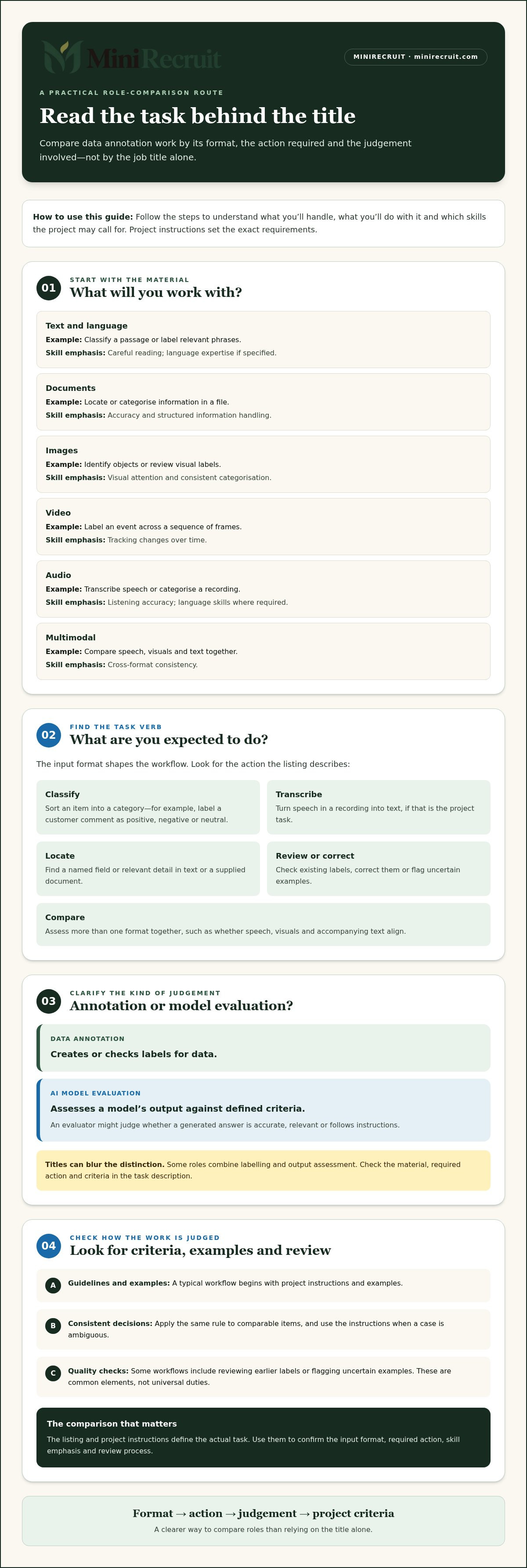
A typical workflow starts with project guidelines and a set of examples. You follow the criteria to classify, label, review or correct each item. For example, a text task might ask you to label a customer comment as positive, negative or neutral. An image task might involve identifying objects and assigning each to the right category.
Consistency is essential: apply the same rule to comparable items, and use the project instructions when a case is ambiguous. Some workflows include quality checks, such as reviewing earlier labels or flagging uncertain examples. These are common elements, not universal duties. The judgement required and pace depend on the data and task.
How does annotation differ from AI model evaluation?
Data annotation creates or checks labels for data, whilst AI model evaluation assesses a model’s output against defined criteria. An evaluator might judge whether a generated answer is accurate, relevant or follows instructions. Some roles combine both activities, for example by labelling examples and then assessing model responses against those labels.
The distinction can be less clear in practice than the job title suggests. A project may call structured ratings “evaluation”, or include review work in an annotation role. Read the task description for the action required, the material you’ll handle and the criteria you’ll apply. This gives you a clearer picture than the title alone.
Which data annotation job types match different task formats?
Data annotation jobs are easier to compare when grouped by the material you’ll handle, rather than by title. “Annotator”, “reviewer” and “evaluator” can describe different duties at different employers. A text project may require language judgement, while an image task may focus on identifying objects. The input format shapes the workflow, decisions and skills involved.
The categories below are practical guides, not fixed job definitions. Project instructions set the exact labels and review process. Some roles cover one format; others combine several.
Text, language and document annotation
Text tasks can involve classifying a comment, identifying relevant details or labelling parts of a passage. Language-specific work may require fluency, grammar knowledge or sensitivity to language use. That differs from general text labelling, where the main requirement is following the project’s classification rules. Document tasks can involve locating or categorising information in supplied files, such as identifying a named field or sorting content by type.
Image, video, audio and multimodal annotation
Image and vision tasks focus on still visuals: identifying objects, assigning categories or reviewing existing labels. Video work uses moving footage and may require reviewing frames over time to capture events or changes. Audio tasks can involve listening, transcription or categorisation, depending on the project. Multimodal work combines inputs, such as video with speech or images with accompanying text. The review process may need to check that labels align across formats, not just within each one.
Use this comparison to identify the likely emphasis of a task. The listing and project instructions set the actual requirements.
| Format | Example task | Likely skill emphasis |
|---|---|---|
| Text and language | Classify a passage or label relevant phrases | Careful reading; language expertise if specified |
| Documents | Locate or categorise information in a file | Accuracy; structured information handling |
| Images | Identify objects or review visual labels | Visual attention; consistent categorisation |
| Video | Label an event across a sequence of frames | Tracking changes over time |
| Audio | Transcribe speech or categorise a recording | Listening accuracy; language skills where required |
| Multimodal | Compare speech, visuals and text together | Cross-format consistency |
Before choosing a role, note the input format and the action expected: classify, transcribe, locate, review or compare. Then check whether the task calls for general accuracy or a specific language or domain skill. This narrows the field more reliably than searching titles alone. MiniRecruit’s categories include Data Annotation, Multimodal & Vision, Video Evaluator, Language Experts and Domain Experts, helping organise a search by task emphasis. Browse data annotation categories to see how roles are grouped.
How to compare data annotation job requirements, workload and pay
Compare the terms behind each listing before deciding whether a role suits you. Remote work doesn’t automatically mean worldwide eligibility, and similar titles can come with different task formats, schedules or contract arrangements. Use the criteria stated in each listing rather than assumptions based on another employer’s role.
| Factor | What to compare | Why it matters |
|---|---|---|
| Eligibility | Permitted country or region, and any location restrictions | Remote roles may be limited to specific locations. |
| Task format | Text, language, image, video, audio, documents or mixed inputs | Shows what you’ll handle day to day. |
| Experience | Entry-level criteria, prior project work or specialist expertise | Clarifies whether the role matches your background. |
| Schedule | Expected hours, availability windows or task-based workflow | Helps you assess fit with existing commitments. |
| Contract and pay | Hourly or per-task basis, contract terms and payment details | Defines what the advertised rate describes. |
Keep the comparison specific. “Remote” describes the work arrangement, not universal eligibility. Each listing defines where applicants can work. Similarly, a flexible schedule doesn’t tell you how much work will be available. Note the stated location, task, experience level and terms so you can distinguish a practical match from a role that only sounds suitable.
Which skills and experience do listings request?
Many tasks call for attention to detail, clear written communication, consistent judgement and the ability to follow detailed guidelines. Specialist roles may ask for relevant language fluency, coding ability or subject knowledge. Requirements differ by project. Compare each listing’s criteria directly rather than assuming one qualification or skill set applies to all data annotation jobs.
How should you interpret pay and project availability?
An hourly rate describes pay by time worked, subject to the listing’s terms. Per-task pay describes compensation for completed units, so the amount of work and time needed per unit affect how useful the figure is for comparison. A stated maximum is a ceiling advertised for that role or task, not a typical earning level. Don’t convert it into assumed weekly or monthly income without confirmed hours and task volume.
Advertised pay is not a guarantee of task volume, hours or continuity. Before applying, look for the schedule, expected workload, contract basis and payment terms. If these details aren’t clear in the listing, treat the advertised rate as one part of the comparison, not a forecast of earnings.
How to find and assess data annotation jobs before applying
A focused search reduces time spent on roles that don’t fit your skills or location. Use the same sequence for each listing: choose relevant task categories, check eligibility, compare the terms, then open the application route. Assess the opportunity before sharing personal details.
- Choose task categories. Start with work that matches your experience, such as general annotation, language tasks, image review or video evaluation. Add specialist categories only if you meet the stated expertise requirements.
- Check eligibility. Review the permitted country or region and the working arrangement. “Remote” doesn’t necessarily mean applicants can work from anywhere.
- Compare the terms. Review the task scope, experience criteria, pay format, schedule and contract details. Compare like with like instead of relying on job titles or headline rates.
- Open the application. Confirm the hiring company, read the full role description and check that the application destination matches the company’s official process before submitting details.
Narrow the search by task, expertise and eligibility
Begin with the format you’re prepared to handle. Language roles may depend on fluency or knowledge of language use; technical or professional roles may require relevant coding or subject expertise. General annotation tasks can have different criteria. Check location conditions early, too. A role that suits your skills still won’t be practical if your location isn’t eligible or the working arrangement doesn’t fit.
Filters can make this first pass more efficient, but the listing itself remains the source for role-specific requirements. Treat category labels as a way to narrow results, not as a substitute for reading the criteria.
Review the listing and prepare a focused application
Read the full task scope and stated requirements before applying. Note the pay basis, contract details and any schedule or availability expectations. Then prepare concise evidence that relates directly to the role: examples of accurate review, relevant subject knowledge, language ability or prior annotation work. Tailor your application to the criteria rather than relying on a general summary of your experience.
Selection steps vary by employer and role. Some may include qualification assessments or other screening stages, so don’t assume one application process applies across the field. Follow the instructions on the official application destination, and provide only the information requested through that route. Look for clear task requirements, pay terms and an application link that leads to the hiring company’s official process.
To apply this process to current opportunities, use MiniRecruit’s curated directory of remote AI training and data annotation roles. Its listings are updated daily and link directly to hiring companies’ official application pages. Browse current data annotation listings by category and eligibility, then review each role’s terms before applying.
Find current data annotation jobs through MiniRecruit
MiniRecruit is a curated directory of remote AI training, data annotation, LLM evaluation and related opportunities. It brings listings from different hiring companies together, with a direct link to each company’s official application page. Listings are updated daily, giving you a practical starting point for finding current opportunities beyond a search by job title alone.
Each employer defines its own role requirements and process. Eligibility, selection steps, work schedule, contract terms and pay can differ between listings, including roles in the same category. Use the directory to identify relevant openings, then rely on the specific listing and employer’s application page for the terms of that role.
Use directory categories to identify relevant openings
Start with Data Annotation, then consider adjacent categories that match your experience. The directory also includes Multimodal & Vision, Video Evaluator and Language Experts. These categories help organise roles by task emphasis, but the title is only a starting point. Read the description to understand the work, the skills requested and any project-specific conditions.
Use categories and eligibility information to narrow your search. A language-focused role may suit someone with relevant fluency, while a vision or video opportunity may align better with experience reviewing visual material. Check location requirements as well: remote eligibility is set by the individual listing, not implied worldwide access.
Read pay details just as carefully. Treat any advertised rate as information about that specific listing, not a forecast of earnings or a promise of ongoing work. A stated maximum doesn’t establish typical pay, task volume or continuity. Compare the pay format and project terms in the role description before deciding whether the opportunity fits.
Move from a listing to the employer’s application
Open a relevant listing and review its full description before proceeding. Check the task scope, eligibility and stated requirements, along with any available information about schedule, contract basis and pay. This final review helps you avoid applying based only on a category label or headline detail that doesn’t match your circumstances.
When you’re ready, follow the link to the hiring company’s official application page and use the process specified there. MiniRecruit provides a route to discover the listing; the hiring company sets the selection process and handles the application. Follow its instructions and assess any qualification steps in the context of that role.
For a focused search across current data annotation jobs and related remote AI opportunities, browse current data annotation jobs on MiniRecruit. Select relevant categories, check eligibility and review each employer’s terms before applying.
Choose your next role with a focused search
Make your next step specific. Select the task format and expertise you want to use, then compare suitable openings against your location and work preferences. A focused search helps you assess each opportunity on its own terms, rather than treating every role title as interchangeable.
MiniRecruit’s directory includes Data Annotation, Multimodal & Vision and Video Evaluator categories. Listings are updated daily and link to hiring companies’ official application pages, so you can move from discovery to the employer’s process. Each listing is distinct: review its requirements and terms before deciding whether to apply.
Start with the category that best matches your experience, then explore adjacent work if the tasks and eligibility suit you. Browse current data annotation jobs and find an opening that fits your next step. A careful, targeted application is a practical way to put your skills to work.
Frequently Asked Questions
What does a data annotation job involve?
A data annotation job involves working through supplied examples and applying the project’s instructions to each one. The task might be to mark a phrase that names a place, categorise a recording by topic or check whether an existing label fits. Some projects also ask workers to flag uncertain cases. The precise workflow depends on the data and criteria, so read the task guidance before starting.
Can you do data annotation work remotely?
Yes, some data annotation work is remote, and tasks may be completed online from an eligible location. Remote access doesn’t mean every role accepts applicants worldwide. Employers set their own location conditions, and some opportunities may use a different working arrangement. Before applying, check whether the listing includes your country and whether its schedule suits your circumstances.
Do data annotation jobs require a degree?
Not always. Some entry-level roles may focus on accuracy and the ability to follow instructions rather than a university qualification. Specialist work can have different criteria, particularly if it involves coding, a technical subject or professional knowledge. Read the essential requirements separately from preferred experience. If a degree isn’t specified, use relevant work, language ability or subject expertise to show how you meet the stated criteria.
How much do data annotation jobs pay?
Pay varies by role, employer and arrangement. MiniRecruit listings may advertise rates up to USD 400 per hour, but that figure is a listing-specific maximum, not typical or guaranteed pay. For context, ZipRecruiter reported a US average annual salary of USD 52,488 for a data annotator on 12 October 2026. A salaried benchmark and a contract listing aren’t directly comparable, so assess each opportunity’s terms.
Are data annotation jobs usually full-time or part-time?
They can be full-time, part-time or project-based; there isn’t one standard schedule across the field. A role may set regular hours, offer flexible scheduling or make work available in batches. These arrangements affect how well a position fits around other commitments. Check whether the listing describes a continuing role or a defined project, and distinguish schedule flexibility from a promise of regular work.
Can beginners apply for data annotation jobs?
Yes, beginners can apply for roles whose criteria match their current skills. Some entry-level opportunities require limited technical experience, but accuracy, careful reading and consistent decisions still matter. An employer may use a screening task or qualification stage to assess those abilities. Start with listings that state beginner-friendly requirements, follow the instructions closely and avoid overstating experience you don’t have.
What is the difference between data annotation and data labelling?
The terms often overlap: both can refer to adding information that makes data easier to organise or use. “Labelling” commonly describes assigning a category or tag, whilst “annotation” can also refer to more detailed marks, such as identifying a phrase or transcribing speech. Employers don’t always use the words consistently. Check the task description to see what actions the role actually requires.